


Google Site Kit is the free, official WordPress plugin from Google, and it’s a genuinely useful way to see Google Analytics, Search Console, AdSense, and PageSpeed data in one place. The real question isn’t whether it works — it’s whether it does enough for your site.
This review covers what Site Kit does well and where it falls short — especially around eCommerce revenue, automatic event tracking, and who on your team can actually see the reports — so you can decide whether it’s all you need, or whether a plugin like ExactMetrics fills the gaps.
Google Site Kit vs. ExactMetrics at a glance
| Site Kit by Google | ExactMetrics | |
|---|---|---|
| Setup | Connect Google services, no code | Guided wizard connects GA4 for you, no code |
| Google Analytics (GA4) reports in WordPress | Yes | Yes, in plain English |
| eCommerce revenue & average order value | No | Yes — revenue, conversion rate, top products, AOV (Pro) |
| Form & conversion tracking | No | Yes (Pro) |
| Auto-track outbound clicks & downloads | Needs Google Tag Manager | Automatic, no Tag Manager |
| Ad-pixel management (Meta, Google Ads, etc.) | No | Yes (Pro) |
| Who can view reports | Administrators only, by default | Role-based access you control |
| Price | Free | Free plan, plus paid upgrades (see pricing) |
Bottom line: Site Kit is a great free way to glance at Google’s data. If you run a store, track form conversions, or want your team to see their own reports without extra setup, that’s where ExactMetrics picks up — the same GA4 data, with the WordPress-specific tracking Site Kit leaves out.
Google Site Kit WordPress Plugin Features
Wondering what the Google Site Kit WordPress plugin can do? Here are the features it includes:
Google Analytics
When you connect Site Kit with your Google Analytics account, it will install the tracking code on your site for you. Then, your site data will be collected and tracked in Google Analytics.
Google Search Console
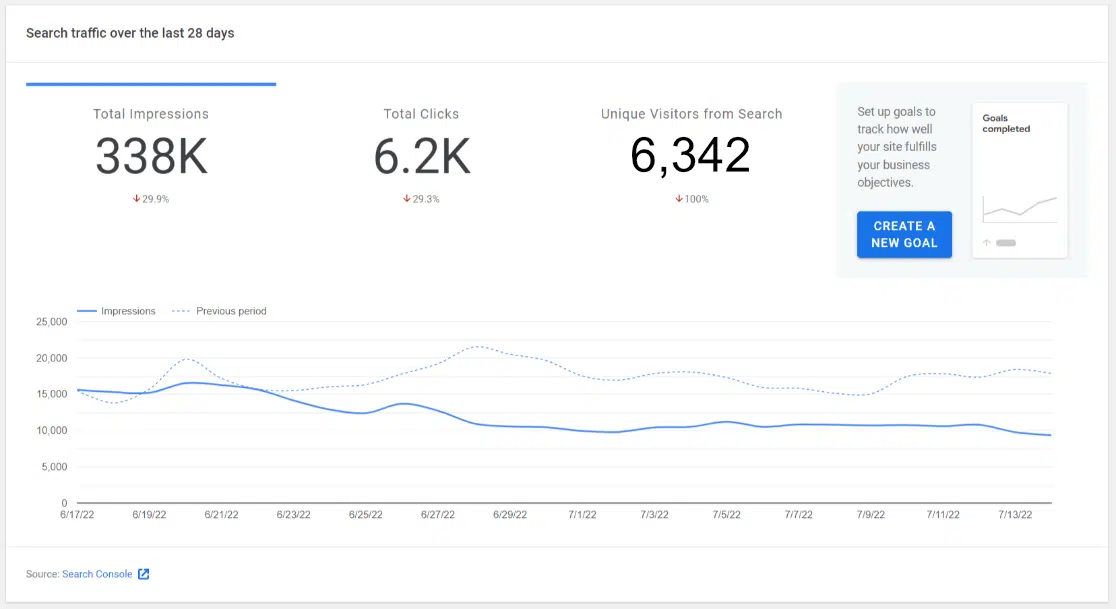
Site Kit will connect your site with your Google Search Console property, or create one for you if you don’t have one set up yet. This will capture data about your site’s performance in Google Search, like what keywords you rank for and how often your pages came up in search results. You’ll get a basic Search Console report in your Site Kit dashboard that includes impressions, clicks, and visitors from search:
AdSense
Do you run AdSense ads on your site? If so, Google Site Kit will place ad code on every page of your site. If you don’t have AdSense but would like to get started, you can sign up through the Google Site Kit dashboard.
You’ll also see a basic AdSense report within your WordPress Google Site Kit dashboard:

PageSpeed Insights
Use the PageSpeed Insights report inside of Google Site Kit to see how fast your website is and where you might be able to make some improvements. You can also access this report any time by visiting pagespeed.web.dev.

Google Tag Manager
If you’re a Google Tag Manager user, you can connect it to your site through Site Kit. It installs the code on your site for you.
Google Site Kit Pros
There are a few pros to using Google Site Kit. First and foremost, it does make it easy to install Google Analytics on your site without messing with your code. The rest of the connections are helpful too, since connecting all those services can be intimidating and difficult for beginners or anyone who isn’t familiar with adding code to a website.
The few dashboard reports that Site Kit has are moderately helpful. It’s useful to have basic traffic stats, keyword stats, AdWords earnings, and other performance numbers right in the WordPress dashboard.
Of course, the other pro of Google Site Kit is that it’s free.
Google Site Kit Cons
Google Site Kit does have a few pretty big cons:
- First of all, Google Site Kit doesn’t really add much value besides connecting your Google services to your website. It doesn’t help you set up conversion tracking or offer any other kind of Google Analytics setup help. This includes eCommerce tracking, which would be a really nice feature to have for anyone setting up an online store.
- It doesn’t automatically track outbound clicks, affiliate links, or file downloads. To capture those events, you’d need to set them up through Google Tag Manager.
- By default, the full dashboard is visible only to Administrators, so editors and clients can’t see their own reports.
- Because it loads several Google services on every page, some users report a drop in their PageSpeed score after installing it — larger when AdSense is connected too.
- Finally, Google Site Kit doesn’t help you at all with GDPR compliance. Site Kit doesn’t give you any options for automatically disabling tracking, hiding IP addresses, or anything that would help you become compliant.
Final Thoughts: Google Site Kit Review
While the Google Site Kit WordPress plugin is helpful for linking your Google services with your WordPress site, its reports are very basic (and in some cases, not there at all) and it doesn’t help you set up your Google Analytics to track conversions or eCommerce.
So, overall, there are much better choices for WordPress Google Analytics plugins. The best one? ExactMetrics.
ExactMetrics is the best premium WordPress analytics plugin. With ExactMetrics, there’s a whole list of things you can set up and monitor in Google Analytics and your WordPress dashboard.

Our most popular features include:
- Easy eCommerce tracking setup and reporting
- Top outbound and top affiliate link clicks
- GDPR compliance
- Scroll tracking
- Form conversion tracking
- Popular posts or products widget
- And more
With ExactMetrics, all your most important metrics are right there in your WordPress dashboard. ExactMetrics reports offer a lot more stats than Google Site Kit does, the plugin will set up eCommerce tracking and form conversion tracking with one click, and much more.
Get started with ExactMetrics now!
Frequently asked questions
Is Google Site Kit free?
Yes, Site Kit is completely free and built by Google. It connects Google Analytics (GA4), Search Console, AdSense, and PageSpeed Insights to WordPress at no cost.
Is Site Kit good for WordPress?
It’s a solid starting point for seeing Google’s data in one dashboard. It’s best for simpler sites that mainly need pageviews, search rankings, and speed scores.
Does Google Site Kit slow down your website?
Yes, it can. Site Kit loads Google’s tracking scripts on every page, and users regularly report PageSpeed drops after installing it — modest with just Analytics connected, and larger (sometimes 40+ points) when AdSense is added too. Test your site speed before and after so you can see the real impact.
Does Site Kit track eCommerce or WooCommerce sales?
No. Site Kit has no built-in eCommerce tracking, so it won’t show revenue, conversion rate, top products, or average order value. For that, use ExactMetrics or set up GA4 eCommerce tracking manually.
Site Kit vs. ExactMetrics — which should I use?
Site Kit is great for a free, high-level view of Google’s data. ExactMetrics goes further with one-click eCommerce and form tracking, automatic event tracking (no Google Tag Manager), and role-based report access.
Do I need both Site Kit and ExactMetrics?
You don’t need both. Both read your GA4 data, so most site owners pick one. Choose ExactMetrics if you want deeper, WordPress-specific tracking and reports.
If you liked this article, you might want to check out 8 Google Analytics Metrics Every Business Should Track.
Don’t forget to follow us on Twitter and Facebook to see all the latest Google Analytics tutorials.