


“Should I use ExactMetrics or Google Analytics?”
This question pops up constantly in WordPress forums, and it reveals a common misunderstanding that confuses many website owners.
Here’s the truth: ExactMetrics vs Google Analytics isn’t actually a competition. They’re not alternative tools where you pick one or the other. They’re complementary solutions that work together.
Many beginners assume they must choose between a free tool (Google Analytics) and a paid one (ExactMetrics), but that’s not the choice.
The real question is: Do you want to spend hours learning Google Analytics’ complex interface and coding custom tracking, or do you want analytics set up in 10 minutes with all your data in simple reports?
In this guide, we’ll clear up the confusion between ExactMetrics and Google Analytics. You’ll discover exactly what each tool does, how they work together, and whether ExactMetrics is worth the investment for your specific situation.
Let’s dive in!
In This Article:
- ExactMetrics vs Google Analytics
- Why Should I Use ExactMetrics?
- Final Verdict: ExactMetrics vs Google Analytics
- Frequently Asked Questions: ExactMetrics vs Google Analytics
ExactMetrics vs Google Analytics
Google Analytics is an analytical service by Google, which helps you track how visitors behave on your website.
Meanwhile, ExactMetrics is a powerful WordPress plugin that helps you connect Google Analytics with your site and set up advanced Google Analytics tracking without any coding, It also brings your most important Google Analytics metrics to your WordPress dashboard in user-friendly reports.
In this article, we’ll walk you through ExactMetrics vs Google Analytics and try to clear the air by showing how these 2 services work differently and how they’re tied together.
What is Google Analytics?

Google Analytics is one of the most popular analytics tools used by millions of websites all over the world. It’s a free web service by Google that helps you better understand your audience, track their behavior, and measure your marketing campaign performance.
With Google Analytics, you can unlock valuable insights about your visitors. For instance, it shows the total web traffic on your site, the traffic source (social media, referral, organic search, paid), demographic information about your visitors, which device people use to view your site, and lots more!
Besides that, the tool helps you understand user behavior, like how much time a visitor spends on your blog post, which pages they view the most, how many visitors convert into customers, and a lot more.
As powerful as Google Analytics is, it can be hard for beginners to start using it right from the get-go. That’s because you’ll have to edit code or hire a developer to add Google Analytics tracking code. And, Google Analytics doesn’t have a very straightforward interface. To configure more sophisticated tracking like form submissions, video plays, and eCommerce, you need to configure custom events.
Because of the steep learning curve for anyone who’s not a developer or Analytics professional, it can take a lot of time to learn how to correctly set up and navigate Google Analytics to find the data you need. That’s where ExactMetrics comes into play.
What is ExactMetrics?

ExactMetrics is the best premium WordPress Analytics plugin. It relieves you of all the pain points that typically come with Google Analytics and makes it seamless to set it up tracking on your website. The plugin helps you connect Google Analytics with your WordPress website without having to edit code or use a complicated tool like Google Tag Manager.
That’s not all! ExactMetrics also comes with advanced tracking features that Google Analytics doesn’t track by default. For example, you can set up affiliate link tracking, outbound link clicks, file downloads, telephone link clicks, and a lot more right out of the box.
And the best part, ExactMetrics offers dashboard reports. The plugin will set up all the complicated stuff in Google Analytics behind the scenes and bring all of your important data from Google Analytics to one place, displayed in neatly formatted reports.
Each report is easy to understand, and you won’t need to learn how to use Google Analytics to find the data that matters for your business. But, if you do want to still use Google Analytics to find more data with custom reports, comparisons, etc, all your tracking will already be set up correctly and configured.
Now, let’s look at some of the reasons why you should be using the plugin on your website.
Why Should I Use ExactMetrics?
As you can see, ExactMetrics helps you save time and allows you to focus on growing your business instead of learning about Google Analytics. It has over 1 million active installs, making it one of the most popular Google Analytics plugins for WordPress.
Here are a few reasons why business owners all over the world love using ExactMetrics:
1. Easy Google Analytics Setup
One of the standout features of ExactMetrics is that it lets you add Google Analytics tracking code to your WordPress website without touching a single line of code or hiring a developer.
Thanks to its step-by-step setup wizard, all you have to do is follow the steps, and the plugin will set up Google Analytics on your website. The entire process only takes a few minutes, and you’ll be tracking your visitors and their behavior in no time.

To get started, follow our guide on how to connect Google Analytics with a WordPress website.
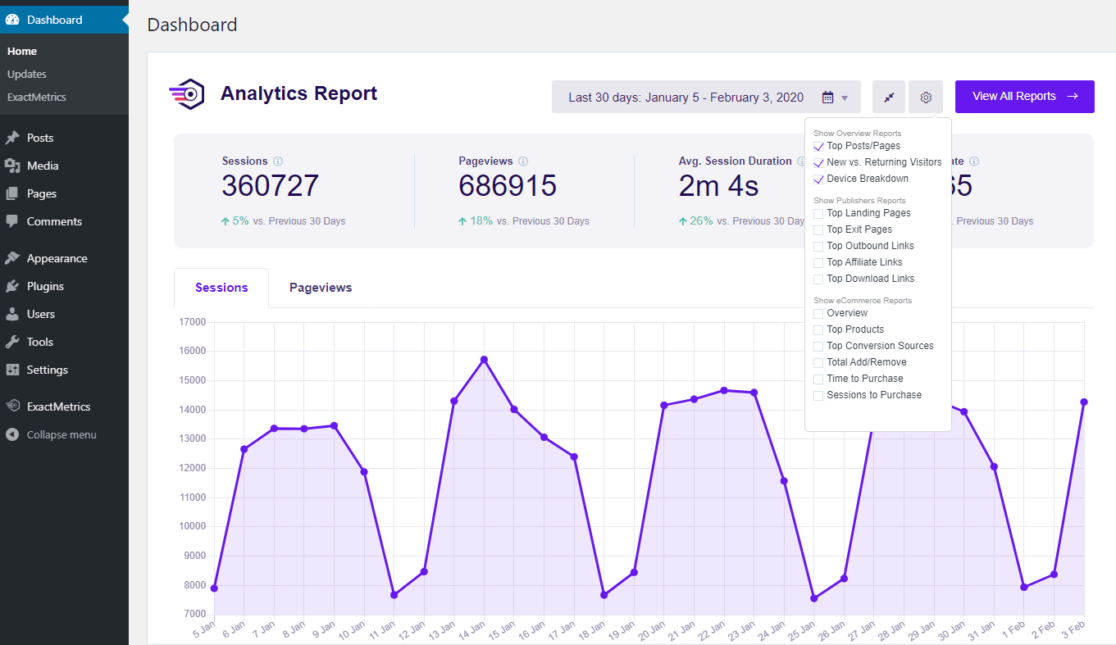
2. Get Deeper Insights with Dashboard Reports
Besides setting up analytics, ExactMetrics also makes it easy to understand Google Analytics reports. It simplifies and brings important data under one roof.
You don’t have to worry about spending a lot of time learning how to navigate Google Analytics to find out how each report works. We carefully designed each ExactMetrics report, so you can easily understand which strategies are working and make data-driven decisions.
Plus, with ExactMetrics dashboard reports, you don’t even have to leave your website. Just view the reports inside the WordPress admin area.
3. Set Up Advanced Tracking
Another reason why smart business owners like to use ExactMetrics is that it helps you set up advanced tracking in Google Analytics with only a few clicks and no manual configuration or coding required.
- Track Outbound Links, Affiliate Links, and More
- One-Click eCommerce Tracking
- Track Customer’s Buying Journey
- Simple Forms Tracking Set Up
- Automatically Track Custom Dimensions
- Track Top File Downloads
- Track Your Marketing Campaigns
- Easy PPC Conversion Tracking
Track Outbound Links, Affiliate Links, and More
The plugin automatically tracks affiliate links, outbound links, telephone links, email links, and more. There’s no need to manually add custom event tracking in Google Analytics, ExactMetrics does it all for you.
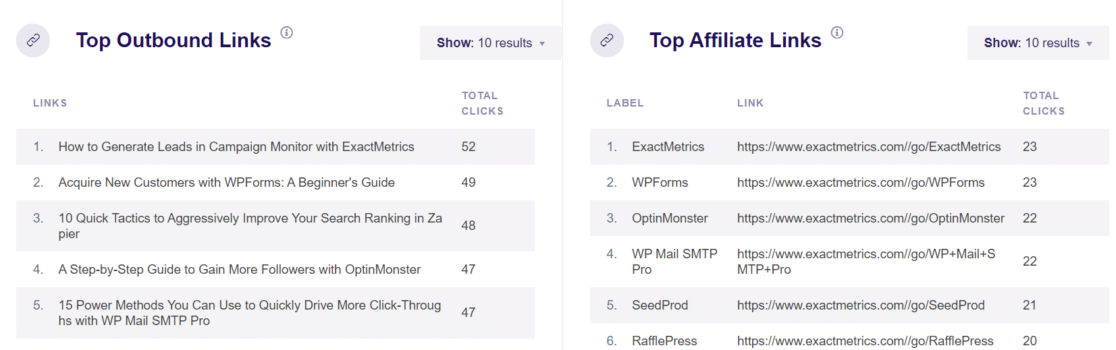
See which affiliates are sending the most traffic to your site, what links visitors are clicking to leave your site, and more.
One-Click eCommerce Tracking
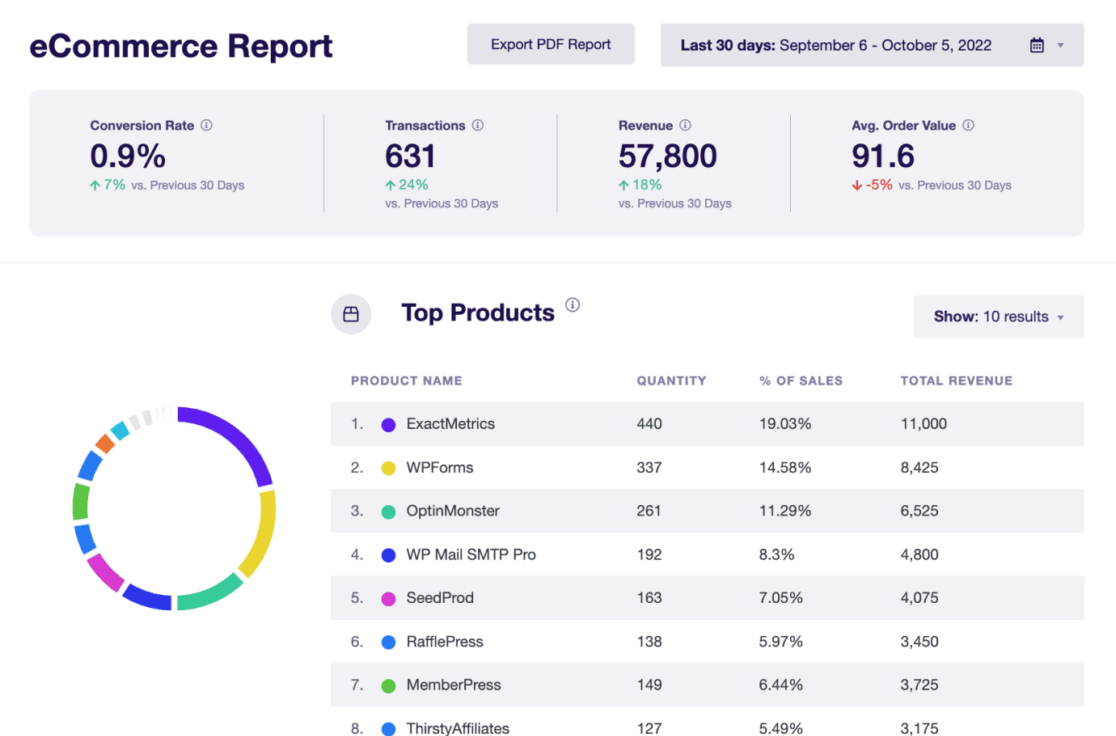
ExactMetrics makes eCommerce tracking a breeze and brings your reports right to WordPress. Easily track revenue, conversion rate, top products, top conversion sources, add-to-cart events, abandoned checkouts, coupon codes, and more.
Track Customer’s Buying Journey
Aside from your detailed eCommerce reports, ExactMetrics’ User Journey addon allows you to see every step in the buying journey for each customer, even if took them multiple sessions or days to purchase.
See how long each step took, what they clicked on, the campaign they came from, and more.

Simple Forms Tracking Set Up
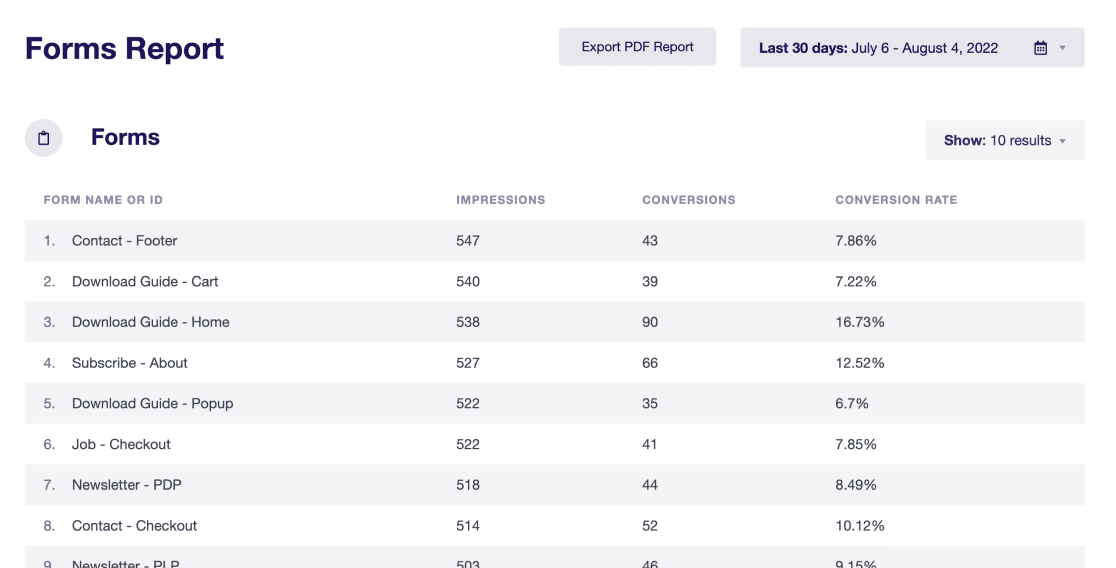
Forms tracking is incredibly easy with ExactMetrics’ Forms addon. The plugin can automatically track any forms on your website and show you impressions, submissions, and the conversion rate for each form.
Automatically Track Custom Dimensions
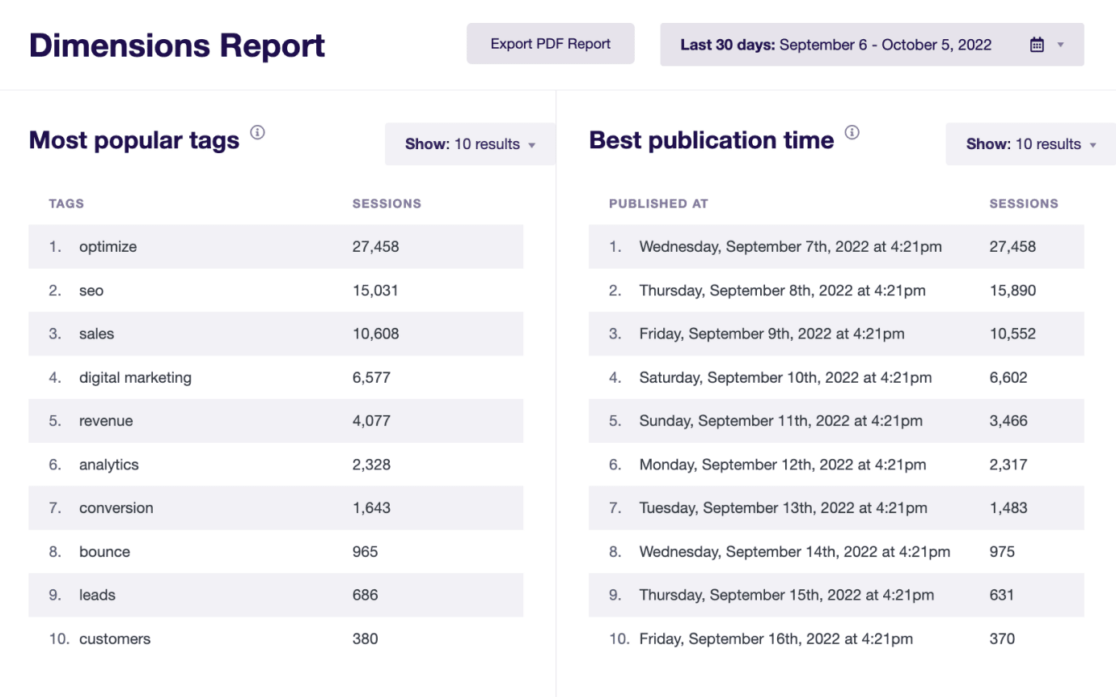
With ExactMetrics, you can also use custom dimensions to set up additional tracking for popular authors, categories, tags, post types, publishing time, and logged-in users.
Track Top File Downloads
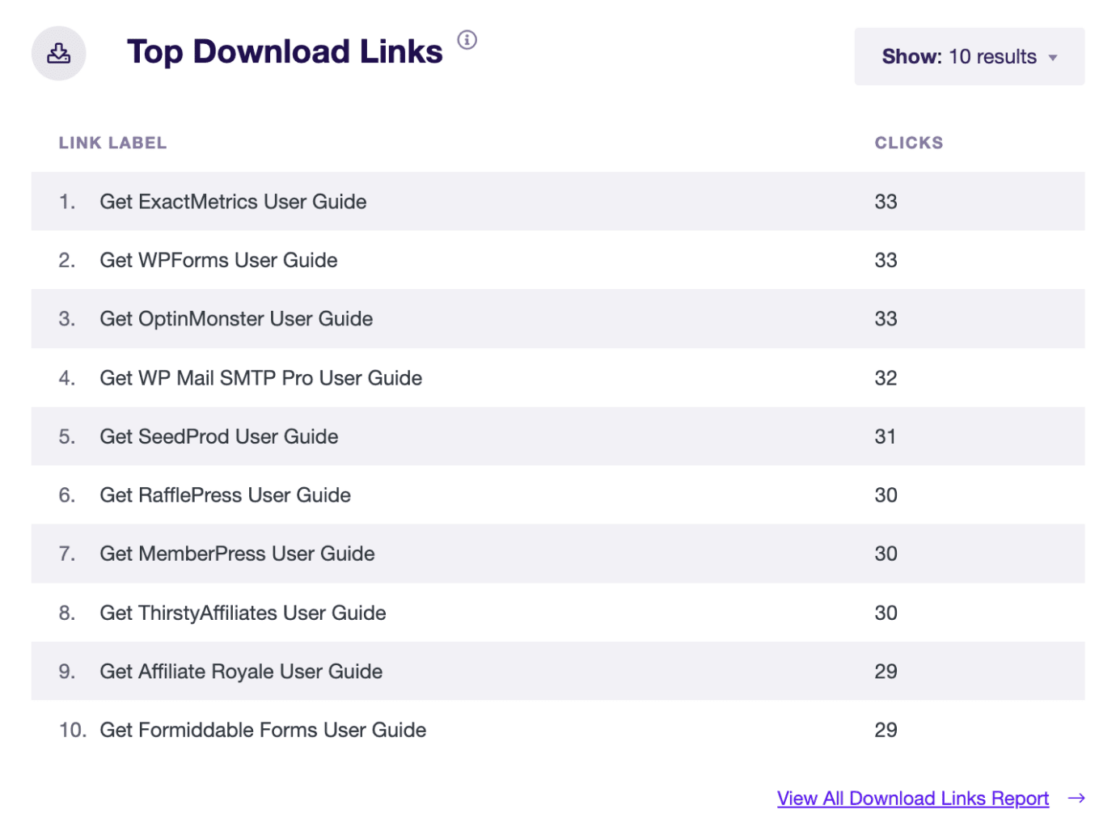
Do you offer downloadable content on your site? If so, you definitely want to track how many times users are clicking to download content. Use the top download links report in ExactMetrics’ Publisher report to see which files are most popular with users.
Track Your Marketing Campaigns
Do you run different campaigns and wonder how much traffic is coming from each campaign? Which one is performing the best?
ExactMetrics provides a super easy URL Builder to help you quickly create custom URLs with UTM parameters so that Google Analytics can differentiate between traffic from each campaign. Then, you can track your marketing campaigns under the Traffic tab in ExactMetrics.

Easy PPC Conversion Tracking
If you run Google Ads, Microsoft (Bing) Ads, or Meta (Facebook) Ads, it can be a real hassle to add tracking code and pixels to your WordPress site. But with ExactMetrics, just paste your info into the Ads Tracking settings, and the plugin will handle the rest!

4. Skyrocket Your Content Marketing Strategy
Along with many of the advanced tracking we already talked about, you can use ExactMetrics to track your content marketing efforts, see what’s working, and gain deeper insights into your site traffic.
Track Your Landing Pages
See your top landing pages along with crucial metrics to see which landing page is converting visitors best, keeping users engaged, and more.

You can also view your top pages report to find out exactly which content gets the most visits and how much time people spend on your top pages, so you can optimize them for more conversions.
Track Which Keywords People Use to Find Your Site
If you’re wondering which keywords people use in search to find your site, ExactMetrics can help. By connecting Google Search Console with Google Analytics, you can see the top 50 search terms in the Search Console report in WordPress.
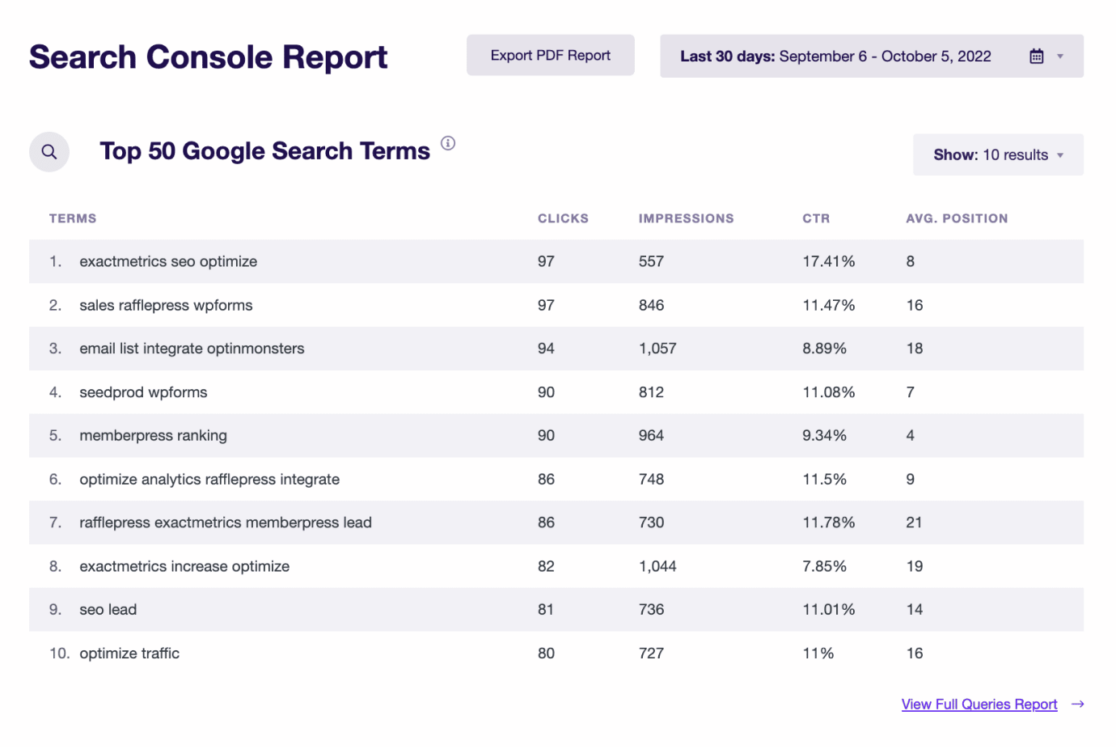
Using this information, you can optimize different keywords in your content, improve their rankings, and increase organic traffic. Plus, identify new keyword opportunities and find similar search terms to target on your site.
5. See Where Your Visitors Come From
Tracking your website visitors with Google Analytics can give you tons of insight into what your audience needs, which channels they come from, which devices they use to interact with your business, and more. ExactMetrics brings tons of this important data right to your WordPress reports!
- See Demographics and Interest Reports
- Track Which Sources Visitors Come From
- See Which Devices and Browsers Visitors Use
See Demographics and Interest Reports
Easily see the Top 10 Counties visitors come from. Plus, use the Publisher report to get a breakdown of your audience’s age, gender, interests, and average scroll depth.
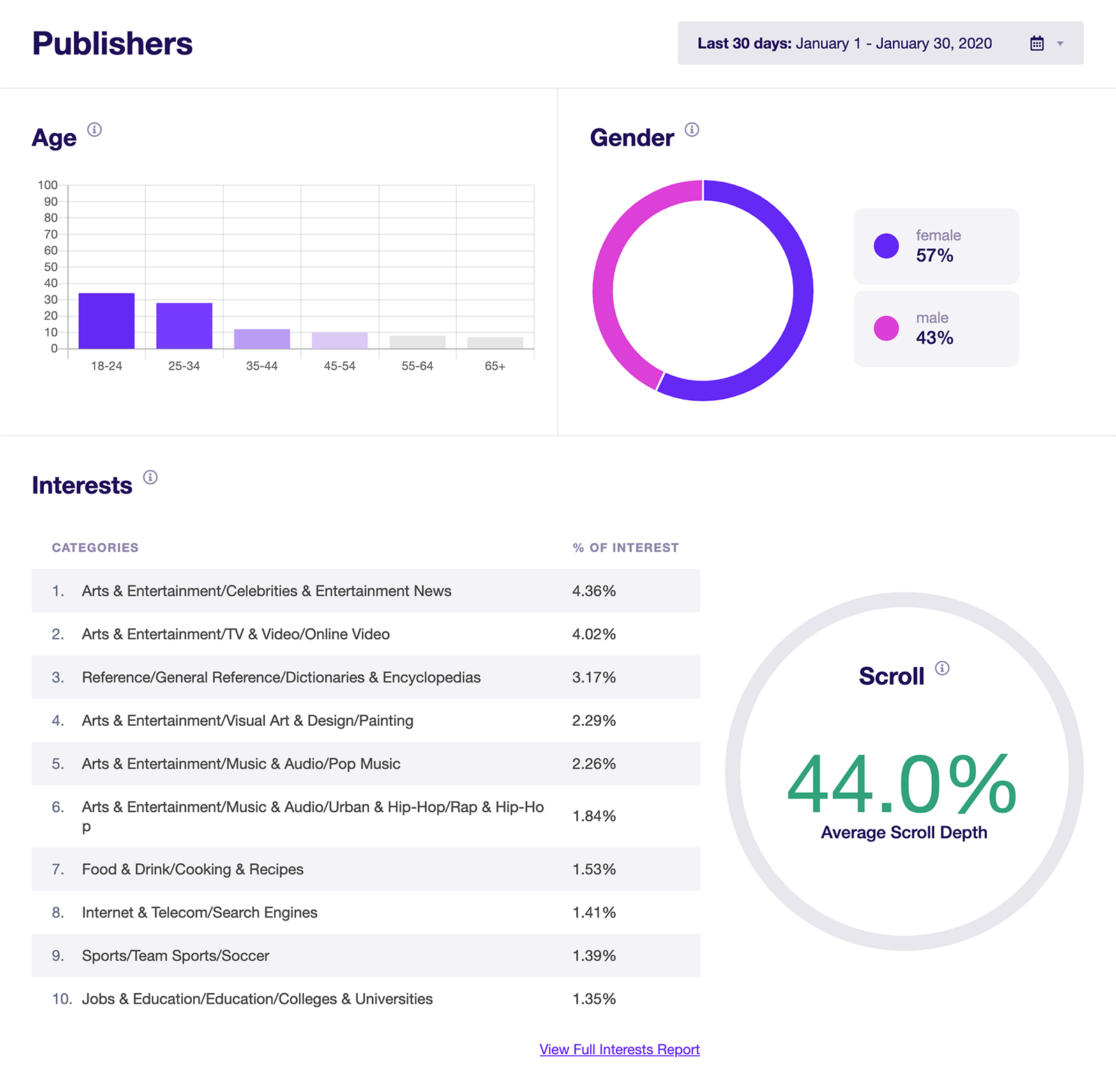
To learn more about getting demographic and interest data about your visitors, check out How to Enable Google Analytics Demographics & Interest Reports.
Track Which Sources Visitors Come From
Do you know which channels visitors use to find your site? Is it social media, organic search, paid ads, or something else?
Easily see which channels are bringing visitors to your site, how well each one is converting, and more in your Traffic Source/Medium report.

In addition to seeing the source/medium of website traffic, you can quickly see your top referral sources. Use this data to focus your efforts on the channels and websites that send high-converting customers.
See Which Devices and Browsers Visitors Use
In today’s times, it’s more important than ever that your site is optimized for mobile devices and different browser types. With ExactMetrics’ Technology report, you can see quickly see a breakdown of the devices and browsers that users access your site on.

6. Optimize Your Site to Boost Engagement
Did you know that ExactMetrics can help boost user engagement on your site? Aside from all the tracking features we’ve already mentioned, there are a few more things that the plugin can do to help you take your website to the next level.
Track Your Video Content
If you use video content on your site, it’s important to find out how many times users are watching those videos, how long they watch for, and more.
With the Media report, you can quickly see video plays, average watch time, average percentage watched, and completion rate for the videos on your site.

By finding out how far users typically get in your videos, you can optimize them to engage users at the right time. Also, use this data to see which videos are performing the best and promote those videos more on your site to improve engagement.
Display Popular Posts or Products
With the Popular Post feature, you can display your best content anywhere on the website. It helps visitors easily find new content, keeps them engaged, and lowers your site’s bounce rate. Using the widget, you can display posts within articles, in the sidebar, or at the end of a post.

There are multiple themes to choose from and different options for customization. As for selecting which posts to display, you can sort them based on comments, share count, or manually enter posts to show up in the widget.
That’s not all. If you have an online store, you can display best-selling products anywhere on your site using the Popular Products option. It helps you keep top-converting items in front of your visitors to boost sales.
Improve Engagement with Fast Load Times
ExactMetrics can help you improve the user experience to increase engagement by tracking how fast your website loads.
Having a website that loads within seconds can have a huge impact on your bottom line. For instance, if a website takes a lot of time to load, users will likely hit the back button and leave your site. As a result, you won’t get high conversions.
Not only that, but it also sends a bad signal to search engines. Since Google uses load time as a ranking factor, it will measure user experience by looking at the site’s speed, responsiveness, and visual stability.
With the ExactMetrics Site Speed report, you can find out your site speed for mobile and desktop. The report will show important metrics to keep an eye on and provide suggestions for improving each of them.
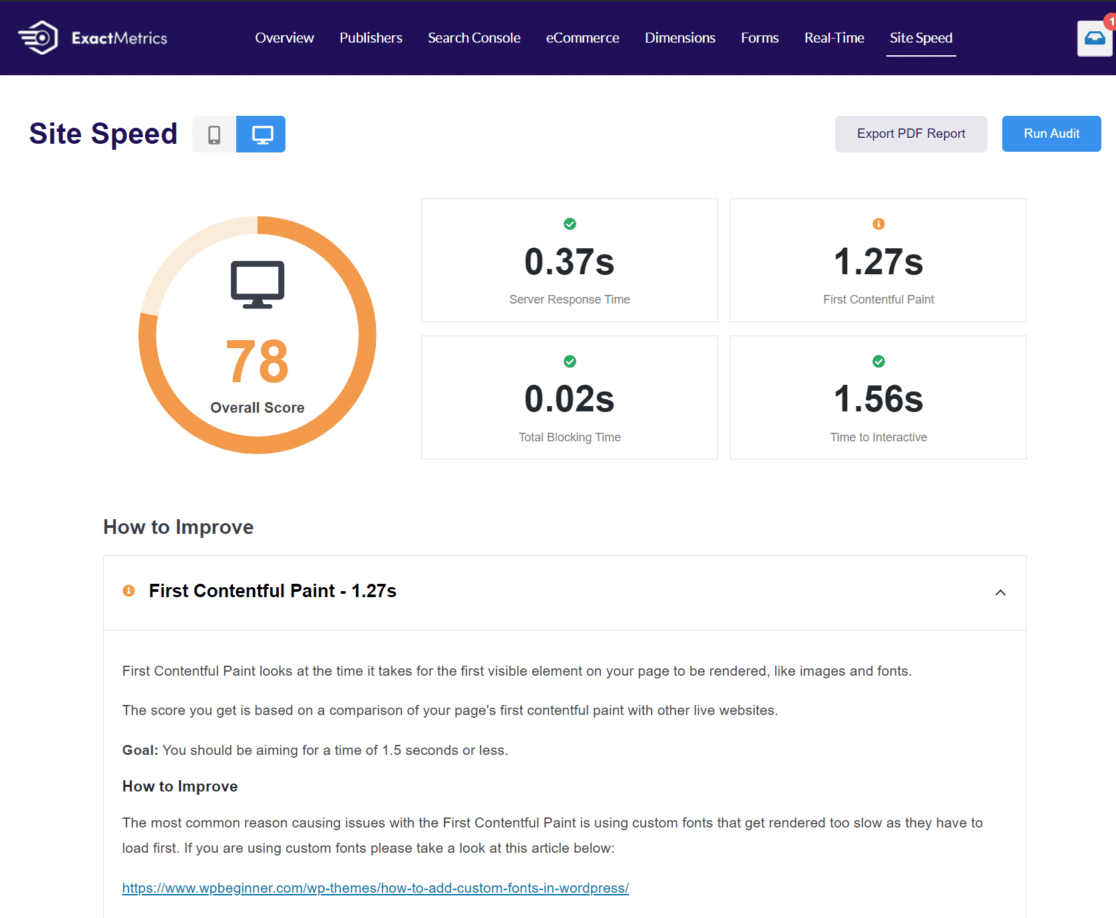
By ensuring a fast website, you can do a much better job of keeping users engaged and reducing bounce rates.
7. Ensure EU Compliance (GDPR)
Now, are you looking for a way to ensure your WordPress site and Google Analytics is compliant with GDPR and EU regulations?
GDPR or General Data Protection Regulation oversees how companies, websites, and internet service providers store and use EU citizens’ data. It requires users’ consent before any business can record, process, and use any personal information of users.
And, failure to meet GDPR requirements can result in huge penalties of up to 4% of annual revenue or 20 million euros, whichever is higher.
But with ExactMetrics, you can automate different processes and ensure Google Analytics complies with GDPR. Thanks to its EU Compliance addon, you can anonymize personally identifiable information and disable different tracking with a click of a button.

Plus, ExactMetrics is also compatible with popular cookie plugins like CookieBot.
Final Verdict: ExactMetrics vs Google Analytics
As you can see, ExactMetrics and Google Analytics are both important.
You will need both solutions to get insights about your visitors and get the data you need to remove the guesswork and make business decisions.
ExactMetrics helps you set up Google Analytics without coding and adds advanced tracking to your site in just a few clicks. It even lets you track additional metrics that Analytics doesn’t offer by default.
And there you have it!
We hope you liked our article on ExactMetrics vs. Google Analytics. If you want, you can also check out our post: Is ExactMetrics Worth It?
Don’t forget to follow us on Twitter and Facebook for the latest tutorials on Google Analytics and WordPress.
FAQs: ExactMetrics vs Google Analytics
Here are answers to common questions about ExactMetrics and Google Analytics.
Do I need both ExactMetrics and Google Analytics?
Yes, you need both to get the full benefit. Google Analytics is the actual analytics platform that collects and stores your website data – it’s the foundation. ExactMetrics is a WordPress plugin that connects your site to Google Analytics and makes it dramatically easier to use. ExactMetrics sets up the tracking code, configures advanced features without coding, and displays your Google Analytics data in easy-to-understand reports inside WordPress. You can’t use ExactMetrics without Google Analytics, and using Google Analytics alone means missing out on easy setup and advanced tracking capabilities.
Is ExactMetrics just a way to view Google Analytics data?
No, ExactMetrics does much more than display data. While it does bring Google Analytics reports into your WordPress dashboard, it also automatically configures advanced tracking that Google Analytics doesn’t do by default – like form submissions, file downloads, affiliate link clicks, eCommerce events, and more. Without ExactMetrics (or manual coding), you’d need to spend hours setting up custom events in Google Tag Manager or writing JavaScript code. ExactMetrics handles all this configuration automatically, then shows you the results in user-friendly reports.
Can’t I just use Google Analytics for free instead of paying for ExactMetrics?
You can use Google Analytics alone, but you’ll face significant challenges. First, you’ll need to manually add tracking code to your WordPress site (often requiring developer help). Second, Google Analytics’ interface is complex and overwhelming for non-experts – finding the data you need takes considerable learning time. Third, advanced tracking like forms, eCommerce, and affiliate links requires custom coding or Google Tag Manager expertise. ExactMetrics eliminates these obstacles, saving hours of setup time and ongoing frustration. For most business owners, the time saved easily justifies the cost.
How much does ExactMetrics cost compared to Google Analytics?
Google Analytics is completely free. ExactMetrics offers several pricing tiers starting with a free Lite version (basic features only) and paid plans beginning around $99.50/year for the Plus plan. The Pro plan ($199.50/year) includes advanced features like forms tracking, eCommerce tracking, and custom dimensions. The Agency plan ($399.50/year) adds features for managing multiple client sites. While ExactMetrics requires payment, it saves significant time and eliminates the need to hire developers for custom tracking setup, which typically costs hundreds or thousands of dollars.
What happens to my data if I stop using ExactMetrics?
Your data remains safe in Google Analytics. Since ExactMetrics connects to Google Analytics (not replacing it), all your historical data stays in your Google Analytics account forever, regardless of whether you continue using ExactMetrics. If you cancel ExactMetrics, you simply lose access to the plugin’s convenient WordPress dashboard reports and automatic tracking setup. You can still access all your data by logging directly into Google Analytics. Your tracking continues working until you manually remove the Google Analytics code from your site.
Can I use ExactMetrics with Google Analytics 4 (GA4)?
Yes, ExactMetrics fully supports Google Analytics 4 (GA4), which is now the standard version of Google Analytics after Universal Analytics was discontinued in July 2023. ExactMetrics automatically sets up GA4 tracking and translates the complex GA4 reports into easy-to-understand formats in your WordPress dashboard. This is especially valuable because GA4’s interface is notoriously difficult for beginners. ExactMetrics makes GA4 accessible even if you’ve never used analytics before.
Is there a free version of ExactMetrics I can try?
Yes, ExactMetrics Lite is available for free from the WordPress plugin repository. The Lite version includes basic Google Analytics setup, dashboard reports showing traffic overview, top pages, and traffic sources. However, advanced features like forms tracking, eCommerce tracking, custom dimensions, and enhanced reports require upgrading to a paid plan. The free version is great for testing the interface and seeing if ExactMetrics fits your workflow before committing to a paid plan.